
How to Generate Grocery Store Receipts
Generating grocery store receipt is now easy with Receiptmakerly. Learn the easy process of generating grocery store receipts with customizable templates.
Grocery receipts mark tax line by line. A single basket mixes exempt food with taxable household goods, so each line carries a code.
Sales tax goes on its own line, as a dollar amount. Virtually every US state requires it.
Weight-priced items show weight, unit price and line price so the customer can check the maths.
Store, register and transaction numbers are what make a receipt retrievable at the returns desk.
Thermal receipts fade. Anything a customer may need for a warranty claim is worth scanning.
Choose a template to get started
Generate Grocery Store Receipts with Customizable Templates
Grocery shopping is a daily affair for many. At the end of the process, the customer gets a grocery receipt. This way, they can double-check whether there was an overcharging incident. Grocery shopping receipts have to be given in an instant. Customers should not be left waiting after reaching the cash counter. Using Receiptmakerly's quick bill-generating platform, you can provide customers with grocery receipts that will help you and your customer to keep an errorless financial calculation on different bases.
Grocery Store Receipts in detail
A receipt for groceries is a document that details the things purchased as well as the overall amount of the transaction that took place at a grocery store. A point of sale (POS) system is a computerized system that conducts transactions at the checkout counter. A POS system frequently creates these receipts.
Grocery receipts should make it easy for customers to read about the purchase. The font has to be big enough, and the bill should account for all the products sold. Items such as cereal must be counted per unit. You can quickly generate the receipt however you want, using the Receiptmakerly tool. Additionally, the platform allows you to store the receipt for later use.
Receipts for groceries might be either paper or electronic these days. Physical receipts are usually printed on thermal paper. Sellers give them to the buyers after transactions. Digital receipts are becoming increasingly common, with many grocery stores offering digital receipts through email, text messages, or a dedicated app. Digital receipts offer a more environmentally-friendly alternative to paper receipts, as well as a convenient way for customers to access their receipts for future reference.
WHAT MAKES GROCERY DIFFERENT
Tax is marked line by line
Most retail receipts list items and add tax at the bottom. Grocery receipts cannot, because a single basket usually mixes taxable and non-taxable goods.
In most US states, unprepared food is exempt or taxed at a reduced rate, while household goods, toiletries and prepared food are taxed at the standard rate. The receipt has to identify which lines fall into which bucket, and the convention is a single letter beside each price.
- X: Standard-rated. Household goods, cleaning products, toiletries, prepared food. Taxed at the full rate.
- N: Non-taxable. Unprepared food in states that exempt groceries. Zero tax applied.
- O: Other or reduced. Items on a special rate, or categories a state treats separately.
Letters vary between retailers and POS systems, so the receipt should carry a short key if the codes are not obvious.
Getting this wrong has a cost. In Washington, tax that is not separately stated is presumed never to have been collected, and the state then applies it to the business's gross receipts. New York requires identifying which items are taxable where a sale mixes both, and stating the total tax due separately.
What belongs on a grocery receipt
The Store
- Store name and logo
- Address and phone
- Store number
- Manager name
The Transaction
- Date and time
- Register or terminal number
- Transaction number
- Operator or cashier ID
- Payment method
Each Item
- Product code or UPC
- Item name
- Quantity or weight
- Unit price
- Line price
- Tax code letter
The Totals
- Subtotal
- Tax, by rate
- Savings or coupons
- Item count
- Total and change given
Types of Grocery Store Receipts
The functionality that grocery shop owners wish to convey through their receipts can cause them to take on a variety of forms. The following are some instances of grocery shop receipts that are standard and readily available to the general public.
- Physical receipts. These are the traditional paper receipts that are printed on thermal paper and given to the customer at the end of the transaction.
- Digital receipts. These receipts are sent to the customer via email, text message, or through a dedicated app. Digital receipts offer a more environmentally-friendly alternative to paper receipts and are becoming increasingly common.
- Itemized receipts. These receipts provide a detailed list of the items purchased, including the quantities and unit prices. Itemized receipts are useful for tracking expenses and returning items.
- Summary receipts. These receipts provide a summarized view of the transaction, including the total cost and any discounts or taxes applied. Summary receipts are typically shorter and easier to read than itemized receipts.
- Loyalty program receipts. Grocery receipts serve as proof of purchase. You can use them to help customers take advantage of the benefits you offer through the loyalty program.
- Tax receipts. These receipts include information about the sales tax collected and can be used for tax purposes.
Importance of Grocery Store Receipts
- Record keeping. Grocery receipts serve as a record of all the items purchased and the total cost of the transaction. This information can be used to track household spending and budgeting, as it provides a detailed overview of how much money is being spent on groceries.
- Returns and exchanges. Grocery receipts are required for returns, exchanges, or disputes with the store. They serve as proof of purchase and help to confirm that the item was bought from the store and is eligible for return or exchange.
- Coupons and discounts. Some grocery stores offer coupons or discounts based on items purchased. These discounts are often linked to the products listed on the receipt, and customers can use the receipt to redeem the discounts or coupons.
- Budget tracking. Grocery receipts can be used to track spending on groceries, which can be helpful for managing household finances and creating a budget. By tracking spending, consumers can identify areas where they can save money.
- Loyalty programs. Numerous grocery businesses provide customer loyalty programs that offer incentives for continued purchases. Grocery receipts serve as proof of purchase and are used to track these rewards.
- Quality control. Grocery receipts can provide information about the date of purchase of perishable items, which can be useful for monitoring food safety and quality control.
- Warranty tracking. If a purchased item comes with a warranty, the grocery receipt can serve as proof of purchase and be used to make a claim if the item stops working or is otherwise damaged. This is especially important for expensive items such as electronics or appliances.
- Marketing and consumer research. Retailers and manufacturers can use grocery receipts to gather information about consumer shopping habits and preferences. By analyzing receipts, companies can track trends in customer behavior and identify which products are selling well.
One caveat on warranty tracking. Thermal receipts fade with heat and light, and a slip kept in a drawer can be unreadable long before a warranty expires. Photograph anything you may need to claim against, and keep the receipts digitally.
Receiptmakerly for generating Grocery Store Receipts
Receiptmakerly is an online receipt maker tool that allows you to create a variety of bills professionally with the assistance of personalized receipt templates. Therefore, if you run a grocery store, Receiptmakerly is the ideal choice for you as a receipt generator, regardless of how long you've been in business.
Using Receiptmakerly, you can produce top-quality receipts for any purchase made at your store. However, the online tool is not just for grocery receipt making; it can be used for a variety of businesses.
Grocery Store Receipts Templates by Receiptmakerly
Below are some grocery store receipt templates you can avail of from Receiptmakerly.
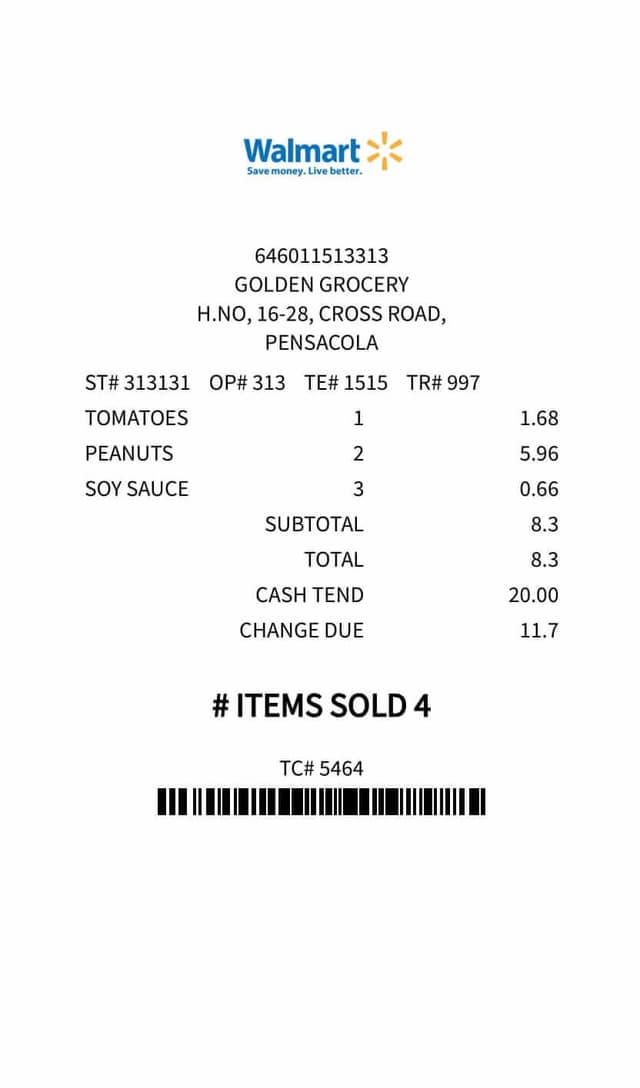
Walmart Style Receipt. A supermarket layout with a logo slot at the top and easy-to-read type that lets customers scan their bill quickly. Click here for more information on the Walmart-style receipt.
Big Bazaar Style Receipt. If your products include everyday groceries, you might try the Big Bazaar-styled receipt. The bill shows tax and a detailed description of every item sold.
Grocery Sample Receipts. Here are some more receipts you can choose from for your billing requirements. You can easily create receipts using the Receiptmakerly tool. You can change your logo and personalize the receipts as you like.
These are layout references for your own branded receipts. Put your own store name and logo on anything you issue, and never present a receipt as though it came from a retailer you are not.
How to generate Grocery Store Receipt Using Receiptmakerly
Making receipts for groceries has never been easier. Once you log in to the Receiptmakerly platform, here's what you need to do.
Select the grocery category
Select the Grocery receipt style category from the dropdown and hit the search button.
Choose a template
Once you find the template you are looking for, hit generate below the desired model.
Enter the details
Enter the details of your receipt and hit generate at the bottom. Your receipt will appear on the right side, and you can instantly download it for use.
Your receipt is ready — click Download
Export as PDF or PNG, or email it straight to the customer.
Disclaimer: Receiptmakerly.com is a web-based application that helps businesses and individuals create professional-looking receipts and bills. Our software generates each document from the information you enter, and you are solely responsible for the accuracy of that information and for how the finished document is used. We do not review or verify the content of receipts created by users, and our Terms of Use prohibit creating any receipt that misrepresents a transaction. All product and company names are trademarks or registered trademarks of their respective holders. Use of them does not imply any affiliation with or endorsement by them.